# Utilisation

[![image.png](https://docs.rakouns.bzh/uploads/images/gallery/2025-10/scaled-1680-/zlNimage-png.png)](https://docs.rakouns.bzh/uploads/images/gallery/2025-10/scaled-1680-/zlNimage-png.png)

### Abonnements

Pour ajouter des abonnements, il y a plusieurs possibilité, des liens, ou importer des fichiers.

#### Import

Dans mon cas, pour aller au plus rapide, j'ai directement importé un fichier OPML, contenant les flux RSS et les catégories.

```xml
<?xml version="1.0" ?>
<opml version="1.0">
  <head>
    <title>Veille Tech Admin Système et Réseau</title>
  </head>
  <body>
    <outline text="Généralistes IT / Sysadmin" title="Généralistes IT / Sysadmin">
      <outline text="Korben" title="Korben" type="rss" xmlUrl="https://korben.info/feed"/>
      <outline text="Journal du Hacker" title="Journal du Hacker" type="rss" xmlUrl="https://www.journalduhacker.net/rss"/>
      <outline text="LinuxFr" title="LinuxFr" type="rss" xmlUrl="https://linuxfr.org/news.atom"/>
      <outline text="Next INpact" title="Next INpact" type="rss" xmlUrl="https://www.nextinpact.com/rss"/>
      <outline text="Developpez.com - SysAdmin" title="Developpez.com - SysAdmin" type="rss" xmlUrl="https://system.developpez.com/index/rss"/>
      <outline text="StackOverflow - sysadmin" title="StackOverflow - sysadmin" type="rss" xmlUrl="https://stackoverflow.com/feeds/tag?tagnames=sysadmin&amp;sort=newest"/>
      <outline text="Hacker News" title="Hacker News" type="rss" xmlUrl="https://hnrss.org/frontpage"/>
    </outline>
    <outline text="Linux / Open Source" title="Linux / Open Source">
      <outline text="LWN.net" title="LWN.net" type="rss" xmlUrl="https://lwn.net/headlines/rss"/>
      <outline text="OMG! Ubuntu!" title="OMG! Ubuntu!" type="rss" xmlUrl="https://www.omgubuntu.co.uk/feed"/>
      <outline text="It's FOSS" title="It's FOSS" type="rss" xmlUrl="https://itsfoss.com/feed"/>
      <outline text="Debian News" title="Debian News" type="rss" xmlUrl="https://www.debian.org/News/news.rdf"/>
      <outline text="Red Hat Blog" title="Red Hat Blog" type="rss" xmlUrl="https://www.redhat.com/en/rss/blog"/>
    </outline>
    <outline text="Réseau / Sécurité" title="Réseau / Sécurité">
      <outline text="CERT-FR" title="CERT-FR" type="rss" xmlUrl="https://www.cert.ssi.gouv.fr/feed/"/>
      <outline text="Zataz" title="Zataz" type="rss" xmlUrl="https://www.zataz.com/feed/"/>
      <outline text="The Hacker News" title="The Hacker News" type="rss" xmlUrl="https://feeds.feedburner.com/TheHackersNews"/>
      <outline text="Bleeping Computer" title="Bleeping Computer" type="rss" xmlUrl="https://www.bleepingcomputer.com/feed/"/>
      <outline text="Krebs on Security" title="Krebs on Security" type="rss" xmlUrl="https://krebsonsecurity.com/feed/"/>
    </outline>
    <outline text="Cloud / DevOps / Containers" title="Cloud / DevOps / Containers">
      <outline text="Scaleway Blog" title="Scaleway Blog" type="rss" xmlUrl="https://www.scaleway.com/en/feed.xml"/>
      <outline text="AWS News" title="AWS News" type="rss" xmlUrl="https://aws.amazon.com/blogs/aws/feed/"/>
      <outline text="Kubernetes Blog" title="Kubernetes Blog" type="rss" xmlUrl="https://kubernetes.io/feed.xml"/>
      <outline text="Docker Blog" title="Docker Blog" type="rss" xmlUrl="https://www.docker.com/blog/feed/"/>
      <outline text="IaC Weekly" title="IaC Weekly" type="rss" xmlUrl="https://feeds.feedburner.com/IaCWeekly"/>
    </outline>
    <outline text="Logiciels Libres / Auto-hébergement" title="Logiciels Libres / Auto-hébergement">
      <outline text="Linux Uprising" title="Linux Uprising" type="rss" xmlUrl="https://www.linuxuprising.com/feeds/posts/default"/>
      <outline text="PrivacyTools" title="PrivacyTools" type="rss" xmlUrl="https://www.privacytools.io/feed.xml"/>
      <outline text="Framasoft Blog" title="Framasoft Blog" type="rss" xmlUrl="https://framablog.org/feed/"/>
    </outline>
  </body>
</opml>
```

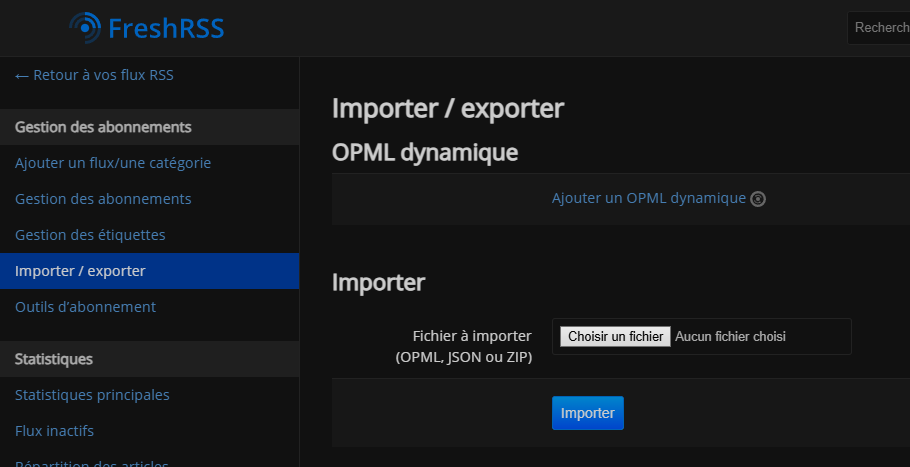
Pour l'ajouter, on doit se rendre sur l'interface web http://&lt;ip&gt;:&lt;port&gt;, créer un compte, et ensuite, cliquer sur "Gestion des abonnements" &gt; Importer/Exporter :

[![image.png](https://docs.rakouns.bzh/uploads/images/gallery/2025-10/scaled-1680-/O8zimage-png.png)](https://docs.rakouns.bzh/uploads/images/gallery/2025-10/scaled-1680-/O8zimage-png.png)

Puis on importe le fichier OPML, les catégories seront créés, avec les flux préintégrés.

#### Manuel

Il est aussi possible de créer des catégories manuellement, dans le menu "Ajouter un flux/une catégorie" sur l'image ci-dessus.  
On peut alors u ajouter des flux manuellement, c'est plus long et laborieux, mais personnalisé, et pour sauvegarder sa configuration, on peut aussi exporter son travail, pour ne pas risquer de le perdre.

### Application mobile

Il n'existe pas d'application officielle FreshRSS, mais plusieurs compatible, comme FeedMe.  
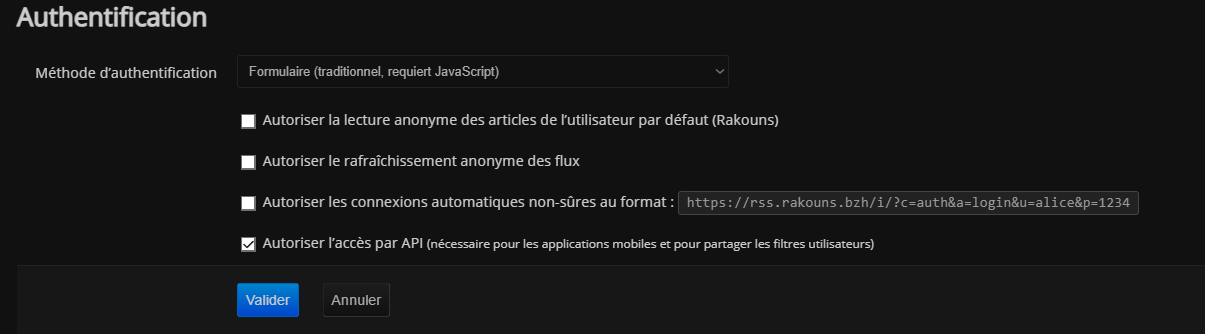
Pour pouvoir utiliser les application mobile, il faut d'abord activer le support de l'API :

[![image.png](https://docs.rakouns.bzh/uploads/images/gallery/2025-10/scaled-1680-/dcUimage-png.png)](https://docs.rakouns.bzh/uploads/images/gallery/2025-10/scaled-1680-/dcUimage-png.png)
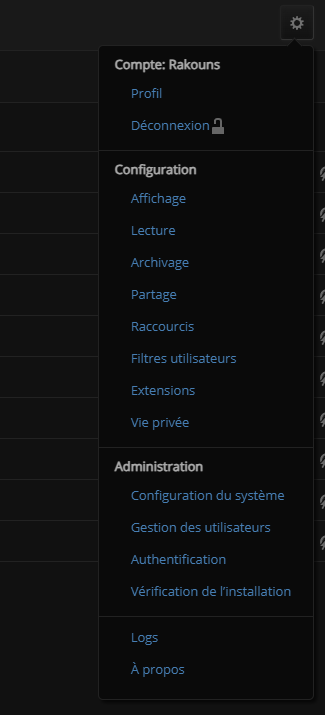
La roue crantée, en haut à droite &gt; Authentification :

[![image.png](https://docs.rakouns.bzh/uploads/images/gallery/2025-10/scaled-1680-/W8fimage-png.png)](https://docs.rakouns.bzh/uploads/images/gallery/2025-10/scaled-1680-/W8fimage-png.png)

Il faut activer "Autoriser l’accès par <abbr>API</abbr> <small>(nécessaire pour les applications mobiles et pour partager les filtres utilisateurs)"</small>

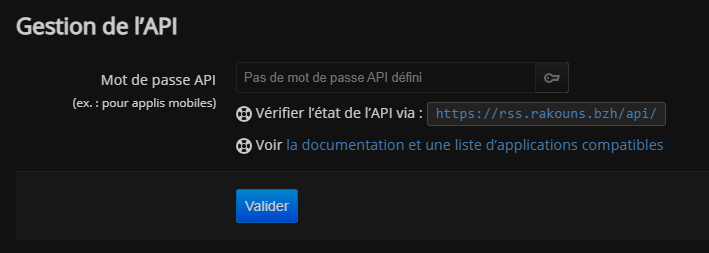
Puis, dans la roue crantée &gt; Profil &gt; Gestion de l'API :

[![image.png](https://docs.rakouns.bzh/uploads/images/gallery/2025-10/scaled-1680-/ITEimage-png.png)](https://docs.rakouns.bzh/uploads/images/gallery/2025-10/scaled-1680-/ITEimage-png.png)

Il faut définir un mot de passe, qui ne sera utile, que sur mobile, à ne pas confondre avec le mot de passe principal, utile pour l'interface Web, si les deux sont différents.

</body>