
Création des GDL
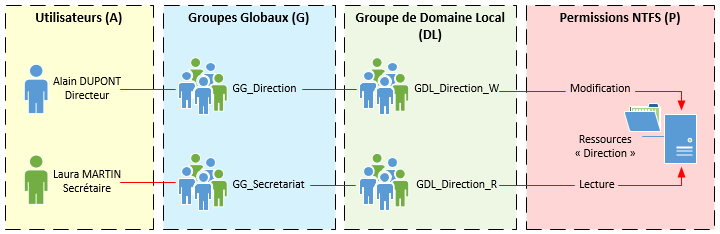 Introduction
On le redit encore, mais le plus long pour l'AGDLP, c'est la mise en place, d'abord des dossiers, et ensuite des groupes GDL, ce que nous allons voir maintenant !
Reprenons notre fichier modèle :
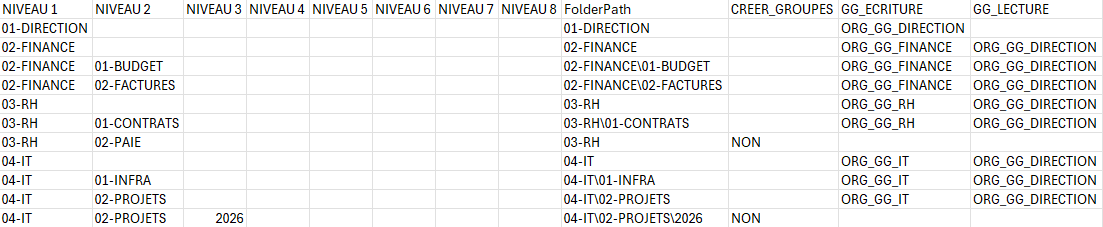
Et en vue CSV :
NIVEAU 1;NIVEAU 2;NIVEAU 3;NIVEAU 4;NIVEAU 5;NIVEAU 6;NIVEAU 7;NIVEAU 8;FolderPath;GG_RW;GG_RO;GDL_RW;GDL_RO;Parent_GDL
00-Commun;;Tous les utilisateurs;GDL_00_RW;GDL_00_RO;
00-Commun\01-Scan;Tous les utilisateurs;;GDL_00-01_RW;GDL_00-01_RO;GDL_00_RO
00-Commun\02-Sport;GG_Sport;;GDL_00-02_RW;GDL_00-02_RO;GDL_00_ROCREER_GROUPES;GG_ECRITURE;GG_LECTURE
01-DIRECTION;;;;;;;;01-DIRECTION;;ORG_GG_DIRECTION;
02-FINANCE;;;;;;;;02-FINANCE;;ORG_GG_FINANCE;ORG_GG_DIRECTION
02-FINANCE;01-BUDGET;;;;;;;02-FINANCE\01-BUDGET;;ORG_GG_FINANCE;ORG_GG_DIRECTION
02-FINANCE;02-FACTURES;;;;;;;02-FINANCE\02-FACTURES;;ORG_GG_FINANCE;ORG_GG_DIRECTION
03-RH;GG_RH,;;;;;;;03-RH;;ORG_GG_RH;ORG_GG_DIRECTION
GG_Direction;03-RH;01-CONTRATS;;GDL_01_RW;GDL_01_RO;
01-;;;;;03-RH\01-Paie;CONTRATS;;ORG_GG_RH;ORG_GG_DIRECTION
03-RH;02-PAIE;;;GDL_01-01_RW;GDL_01-01_RO;GDL_01_RO
01-RH\01-Paie\01-2025;;;GDL_01-01-01_RW;GDL_01-01-01_RO;GDL_01-01_RO
01-RH\01-Paie\01-2025\01-Janvier;;;GDL_01-01-01-01_RW;GDL_01-01-01-01_RO;GDL_01-01-01_RO03-RH;NON;;
01-RH\01-Paie\01-2025\02-Février;04-IT;;;GDL_01-01-01-02_RW;GDL_01-01-01-02_RO;GDL_01-01-01_RO
01-RH\01-Paie\01-2025\03-Mars;;;GDL_01-01-01-03_RW;GDL_01-01-01-03_RO;GDL_01-01-01_RO
01-RH\01-Paie\01-2025\04-Avril;;;GDL_01-;04-IT;;ORG_GG_IT;ORG_GG_DIRECTION
04-IT;01-01-04_RW;GDL_01-01-01-04_RO;GDL_01-01-01_RO
01-RH\01-Paie\01-2025\05-Mai;INFRA;;;GDL_01-01-01-05_RW;GDL_01-01-01-05_RO;GDL_01-01-01_RO
01-RH\02-Formation;;;GDL_01-02_RW;GDL_01-02_RO;GDL_01_RO
01-RH\03-Carrière;;;GDL_01-03_RW;GDL_01-03_RO;GDL_01_RO04-IT\01-INFRA;;ORG_GG_IT;ORG_GG_DIRECTION
04-IT;02-Informatique;GG_Informatique;TousPROJETS;;;;;;;04-IT\02-PROJETS;;ORG_GG_IT;ORG_GG_DIRECTION
les utilisateurs;GDL_02_RW;GDL_02_RO;
04-IT;02-Informatique\01-Procédures;PROJETS;2026;;Tous les utilisateurs;GDL_02-01_RW;GDL_02-01_RO;GDL_02_RO;;;;04-IT\02-PROJETS\2026;NON;;
Pour bien faire, il faut créer deuxtrois GDL par répertoire, un pour afficher le contenu seul, un lecture seule,seule récursif, et un lecture/écriture.écriture récursif.
C'est donc ce qu'on va faire, automatiquement, suivant ce nommage : GDL_<numérotation-répertoire>_RO_VUE, GDL_<numérotation-répertoire>_LECTURE et GDL_<numérotation-répertoire>_RW._ECRITURE.
De plus, nous allons préparer la parentalité des GDL, c'est à dire que chaque enfant GDLGDL_ECRITURE et GDL_LECTURE soit membre de son parent ROGDL_VUE direct, et nous allons également les disposer dans un miroir de l'arborescence dans l'AD.
Cela permet une gestion plus simple car, si nous voulons ajouter des droits sur un dossier N-15 sous dossiers, il est plus simple de naviguer directement dans l'arborescence miroir de l'AD et ainsi ajouté le bon GG à la GDL finale.
Grâce à la parentalité, les droits seront automatiquement les bons.
OU et GDL
Voici donc le script qui nous permet de faire tout cela :
<#
===============================================================================
SCRIPT : 2.1 - Creation_GDL.ps1
OBJET  : Creation des OU et des GDL (ECRITURE / LECTURE / VUE) a partir du CSV
===============================================================================

DESCRIPTION :
  - Pour chaque ligne du CSV ayant un FolderPath et CREER_GROUPES <> "NON" :
      * Construit le "code numerique" a partir des segments du FolderPath
        (ex : "02-03-05" a partir de "02-ADMIN_G\03-PARTAGE\05-...").
      * Cree l arborescence d OU sous l OU racine $BaseOU.
      * Cree 3 groupes AD (Global/Security) :
           GDL_<code>_ECRITURE
           GDL_<code>_LECTURE
           GDL_<code>_VUE
      * Calcule le GDL parent "VUE" (Parent_GDL) en fonction du dossier parent.
      * Met a jour le CSV : GDL_ECRITURE, GDL_LECTURE, GDL_VUE, Parent_GDL.

===============================================================================
#>

Param(
    [string]$CsvPath = "C:\Chemin\vers\fichier.AGDLP\\ORG_ARBO_GDL.csv",
    [string]$BaseOU  = "OU=GDL,OU=AGDLP,DC=domain,DC=local"
)

Try$ErrorActionPreference = "Stop"

# ----------------------------------------------------------------------------
# 0. Module ActiveDirectory
# ----------------------------------------------------------------------------
try {
    Import-Module ActiveDirectory -ErrorAction Stop
}
Catch {}

$FolderToGDL = @{}

Function Create-OU($ouName, $parentDN) {
    $ouDN = "OU=$ouName,$parentDN"
    if (-not (Get-ADOrganizationalUnit -Filter "DistinguishedName -eq '$ouDN'" -ErrorAction SilentlyContinue)) {
        New-ADOrganizationalUnit -Name $ouName -Path $parentDN -ProtectedFromAccidentalDeletion $false
        Write-Host "OU créée : $ouDN"
    }
    return $ouDN
}

Function Create-GDL($GroupName, $OU) {
    if (-not (Get-ADGroup -Filter "Name -eq '$GroupName'" -ErrorAction SilentlyContinue)) {
        New-ADGroup -Name $GroupName -GroupScope Global -Path $OU
        Write-Host "GDL créé : $GroupName dans $OU"
    }
}

# Importer le CSV existant
if (Test-Path $CsvPath) {
    $GDLList = Import-Csv -Path $CsvPath -Delimiter ';' -Encoding UTF8
} elsecatch {
    Write-Error "LeModule fichierActiveDirectory CSVintrouvable. $CsvPathInstaller n'existeRSAT pas./ AD PowerShell."
    exit }

foreach ($row in $GDLList) {
    $folderPath = $row.FolderPath.Trim()
    if ($folderPath -eq "") { continue1
}

# Extraire----------------------------------------------------------------------------
uniquement# les1. numérosFonctions utilitaires
# ----------------------------------------------------------------------------

function Get-NumericCodeFromFolderPath {
    <#
      Extrait pour chaque segment du FolderPath le GDLprefixe numerique (^d+),
      puis joint par un tiret. Exemple :
        "02-ADMIN_G\03-PARTAGE\01-TRUC" -> "02-03-01"
    #>
    param([string]$FolderPath)

    if ([string]::IsNullOrWhiteSpace($FolderPath)) { return $numbersnull }

    $segments = ($folderPathFolderPath -split '\\' | ForEach-Where-Object { $_ -and $_.Trim() -ne '' }
    $nums = foreach ($s in $segments) {
        if ($_s -match '^\d+') { $Matches[0] }
    })
    if ($nums.Count -eq 0) { return $null }
    return ($nums -join '-')
}

function Ensure-OU {
    <#
      Cree une OU si elle n existe pas. Retourne le DN de l OU.
    #>
    param(
        [string]$Name,
        [string]$ParentDN
    )

    $GDL_RWouDN = "GDL_$numbers`_RW"OU=$Name,$ParentDN"
    $GDL_ROexisting = Get-ADOrganizationalUnit -LDAPFilter "GDL_$numbers`_RO"(distinguishedName=$ouDN)" -ErrorAction SilentlyContinue
    if ($existing) {
        Write-Host "  OU existe deja : $ouDN"
        return $ouDN
    }

    New-ADOrganizationalUnit -Name $Name -Path $ParentDN -ProtectedFromAccidentalDeletion $false | Out-Null
    Write-Host "  OU creee : $ouDN"
    return $ouDN
}

function Ensure-Group {
    <#
      Cree un groupe AD Global/Security si absent.
    #>
    param(
        [string]$Name,
        [string]$OU
    )

    $existing = Get-ADGroup -Filter "Name -eq '$Name'" -ErrorAction SilentlyContinue
    if ($existing) {
        Write-Host "  GDL existe deja : $Name"
        return
    }

    New-ADGroup `
        -Name $Name `
        -SamAccountName $Name `
        -GroupScope Global `
        -GroupCategory Security `
        -Path $OU | Out-Null

    Write-Host "  GDL cree : $Name"
}

# Création----------------------------------------------------------------------------
# 2. Lecture du CSV
# ----------------------------------------------------------------------------
if (-not (Test-Path $CsvPath)) {
    Write-Error "CSV introuvable : $CsvPath"
    exit 1
}

$rows  = Import-Csv -Path $CsvPath -Delimiter ";" -Encoding UTF8
$total = $rows.Count
$index = 0

Write-Host "Creation des GDL (ECRITURE/LECTURE/VUE) a partir : $CsvPath"
Write-Host "OU correspondantesde base : $BaseOU"
Write-Host ""

# ----------------------------------------------------------------------------
# 3. Traitement principal
# ----------------------------------------------------------------------------
foreach ($row in $rows) {
    $index++

    # Progression unique
    Write-Progress -Activity "Creation OU et GDL" -Status "$index / $total" -PercentComplete (($index / $total) * 100)

    # Donnees de base
    $folderPath = $row.FolderPath
    if ([string]::IsNullOrWhiteSpace($folderPath)) { continue }

    # Gestion du drapeau de pilotage "CREER_GROUPES"
    $creer = $null
    if ($row.PSObject.Properties.Name -contains "CREER_GROUPES") {
        $creer = $row.CREER_GROUPES
    }
    $creer = if ($creer) { $creer.Trim().ToUpper() } else { "" }

    if ($creer -eq "NON") {
        Write-Host "Skip (CREER_GROUPES=NON) : $folderPath"
        continue
    }

    # 3.1 Code numerique a partir du FolderPath
    $code = Get-NumericCodeFromFolderPath -FolderPath $folderPath
    if ([string]::IsNullOrWhiteSpace($code)) {
        Write-Warning "Aucun code numerique pour : $folderPath -> ligne ignoree"
        continue
    }

    # 3.2 Noms des GDL (en MAJUSCULE)
    $GDL_E = ("GDL_{0}_ECRITURE" -f $code).ToUpper()
    $GDL_L = ("GDL_{0}_LECTURE"  -f $code).ToUpper()
    $GDL_V = ("GDL_{0}_VUE"      -f $code).ToUpper()

    Write-Host "Traitement : $folderPath"
    Write-Host "  GDL_ECRITURE : $GDL_E"
    Write-Host "  GDL_LECTURE  : $GDL_L"
    Write-Host "  GDL_VUE      : $GDL_V"

    # 3.3 Creation de la chaine d OU mirroir du FolderPath
    $parts = $folderPath -split '\\' | Where-Object { $parentDN_ -and $_.Trim() -ne '' }
    $currentOU = $BaseOU
    foreach ($part in $parts) {
        $ouDNcurrentOU = Create-Ensure-OU -Name $part $parentDN-ParentDN $parentDN = $ouDNcurrentOU
    }

    # Calculer3.4 leCreation parentdes GDL3 pourgroupes dans l OU finale
    Ensure-Group -Name $GDL_E -OU $currentOU
    Ensure-Group -Name $GDL_L -OU $currentOU
    Ensure-Group -Name $GDL_V -OU $currentOU

    # 3.5 Calcul du Parent_GDL = GDL_<codeParent>_VUE
    $Parent_GDL = $null
    $parentFolder = Split-Path $folderPath -Parent
    if ($parentFolder -and $FolderToGDL.ContainsKey($parentFolder)parentFolder.Trim() -ne '') {
        $parentGDLparentCode = Get-NumericCodeFromFolderPath -FolderPath $FolderToGDL[parentFolder
        if ($parentFolder]
    } elseparentCode) {
            $parentGDLParent_GDL = ("GDL_{0}_VUE" -f $nullparentCode).ToUpper()
        }
    $FolderToGDL[$folderPath] = $GDL_RO}

    # Créer3.6 lesInjection GDL/ mise a jour des colonnes dans l’OU correspondante
    Create-GDL $GDL_RW $ouDN
    Create-GDL $GDL_RO $ouDN

    # Ajouter les nouvelles colonnes aule CSV
    avecforeach Add-Member($col in @("GDL_ECRITURE","GDL_LECTURE","GDL_VUE","Parent_GDL")) {
        if (-not ($row.PSObject.Properties.Name -contains $col)) {
            $row | Add-Member -MemberType NoteProperty -Name GDL_RW -Value $GDL_RW -Force
    $row | Add-Membercol -MemberType NoteProperty -Name GDL_RO -Value $GDL_RO -Force
    $row | Add-Member -MemberType NoteProperty -Name Parent_GDL -Value $parentGDLnull -Force
        }
    }
    $row.GDL_ECRITURE = $GDL_E
    $row.GDL_LECTURE  = $GDL_L
    $row.GDL_VUE      = $GDL_V
    $row.Parent_GDL   = $Parent_GDL
}

# ExporterEffacer lela barre de progression
Write-Progress -Activity "Creation OU et GDL" -Completed

# ----------------------------------------------------------------------------
# 4. Sauvegarde CSV
mis# à jour----------------------------------------------------------------------------
$GDLListrows | Export-Csv -Path $CsvPath -Delimiter '";'" -NoTypeInformation -Encoding UTF8
Write-Host "CSV mis à jour avec GDL : $CsvPath"
Le tableau CSV qui en ressort devrait ressembler à ça :

Et en version CSV :
NIVEAU 1;NIVEAU 2;NIVEAU 3;NIVEAU 4;NIVEAU 5;NIVEAU 6;NIVEAU 7;NIVEAU 8;FolderPath;GG_RW;GG_RO;GDL_RW;GDL_RO;CREER_GROUPES;GG_ECRITURE;GG_LECTURE;GDL_ECRITURE;GDL_LECTURE;GDL_VUE;Parent_GDL
00-Commun;01-DIRECTION;;Tous;;;;;;01-DIRECTION;;ORG_GG_DIRECTION;;GDL_01_ECRITURE;GDL_01_LECTURE;GDL_01_VUE;
les02-FINANCE;;;;;;;;02-FINANCE;;ORG_GG_FINANCE;ORG_GG_DIRECTION;GDL_02_ECRITURE;GDL_02_LECTURE;GDL_02_VUE;
utilisateurs;GDL_00_RW;GDL_00_RO;02-FINANCE;01-BUDGET;;;;;;;02-FINANCE\01-BUDGET;;ORG_GG_FINANCE;ORG_GG_DIRECTION;GDL_02-01_ECRITURE;GDL_02-01_LECTURE;GDL_02-01_VUE;GDL_02_VUE
00-Commun\02-FINANCE;02-FACTURES;;;;;;;02-FINANCE\02-FACTURES;;ORG_GG_FINANCE;ORG_GG_DIRECTION;GDL_02-02_ECRITURE;GDL_02-02_LECTURE;GDL_02-02_VUE;GDL_02_VUE
03-RH;;;;;;;;03-RH;;ORG_GG_RH;ORG_GG_DIRECTION;GDL_03_ECRITURE;GDL_03_LECTURE;GDL_03_VUE;
03-RH;01-Scan;Tous les utilisateurs;CONTRATS;;GDL_00-01_RW;GDL_00-01_RO;GDL_00_RO
00-Commun\02-Sport;GG_Sport;;GDL_00-02_RW;GDL_00-02_RO;GDL_00_RO
01-RH;GG_RH, GG_Direction;;GDL_01_RW;GDL_01_RO;
01-;;;03-RH\01-Paie;CONTRATS;;ORG_GG_RH;ORG_GG_DIRECTION;GDL_03-01_ECRITURE;GDL_03-01_LECTURE;GDL_03-01_VUE;GDL_03_VUE
03-RH;02-PAIE;;;GDL_01-01_RW;GDL_01-01_RO;GDL_01_RO
01-RH\01-Paie\01-2025\01-Janvier;;;GDL_01-01-01_RW;GDL_01-01-01_RO;GDL_01-01_RO
01-RH\01-Paie\01-2025\02-Février;;;GDL_01-01-02_RW;GDL_01-01-02_RO;GDL_01-01_RO
01-RH\01-Paie\01-2025\03-Mars;RH;NON;;;GDL_01-01-03_RW;GDL_01-01-03_RO;GDL_01-01_RO
01-RH\01-Paie\01-2025\04-Avril;;;GDL_01-01-04_RW;GDL_01-01-04_RO;GDL_01-01_RO;
01-RH\01-Paie\01-2025\05-Mai;04-IT;;;GDL_01-01-05_RW;GDL_01-01-05_RO;GDL_01-01_RO
01-RH\02-Formation;;;GDL_01-01-01_RW;GDL_01-02_RO;GDL_01_RO
01-RH\03-Carrière;;;GDL_01-03_RW;GDL_01-03_RO;GDL_01_RO;04-IT;;ORG_GG_IT;ORG_GG_DIRECTION;GDL_04_ECRITURE;GDL_04_LECTURE;GDL_04_VUE;
04-IT;01-INFRA;;;;;;;04-IT\01-INFRA;;ORG_GG_IT;ORG_GG_DIRECTION;GDL_04-01_ECRITURE;GDL_04-01_LECTURE;GDL_04-01_VUE;GDL_04_VUE
04-IT;02-Informatique;GG_Informatique;TousPROJETS;;;;;;;04-IT\02-PROJETS;;ORG_GG_IT;ORG_GG_DIRECTION;GDL_04-02_ECRITURE;GDL_04-02_LECTURE;GDL_04-02_VUE;GDL_04_VUE
les utilisateurs;GDL_02_RW;GDL_02_RO;
04-IT;02-Informatique\01-Procédures;PROJETS;2026;;Tous les utilisateurs;GDL_02-01_RW;GDL_02-01_RO;GDL_02_RO;;;;04-IT\02-PROJETS\2026;NON;;;;;;
Bien ! A présent nous avons des groupes bien nommés dans des OU bien classées.
Nous allons passer à la mise en place de la hiérarchie des groupes !